MCP servers
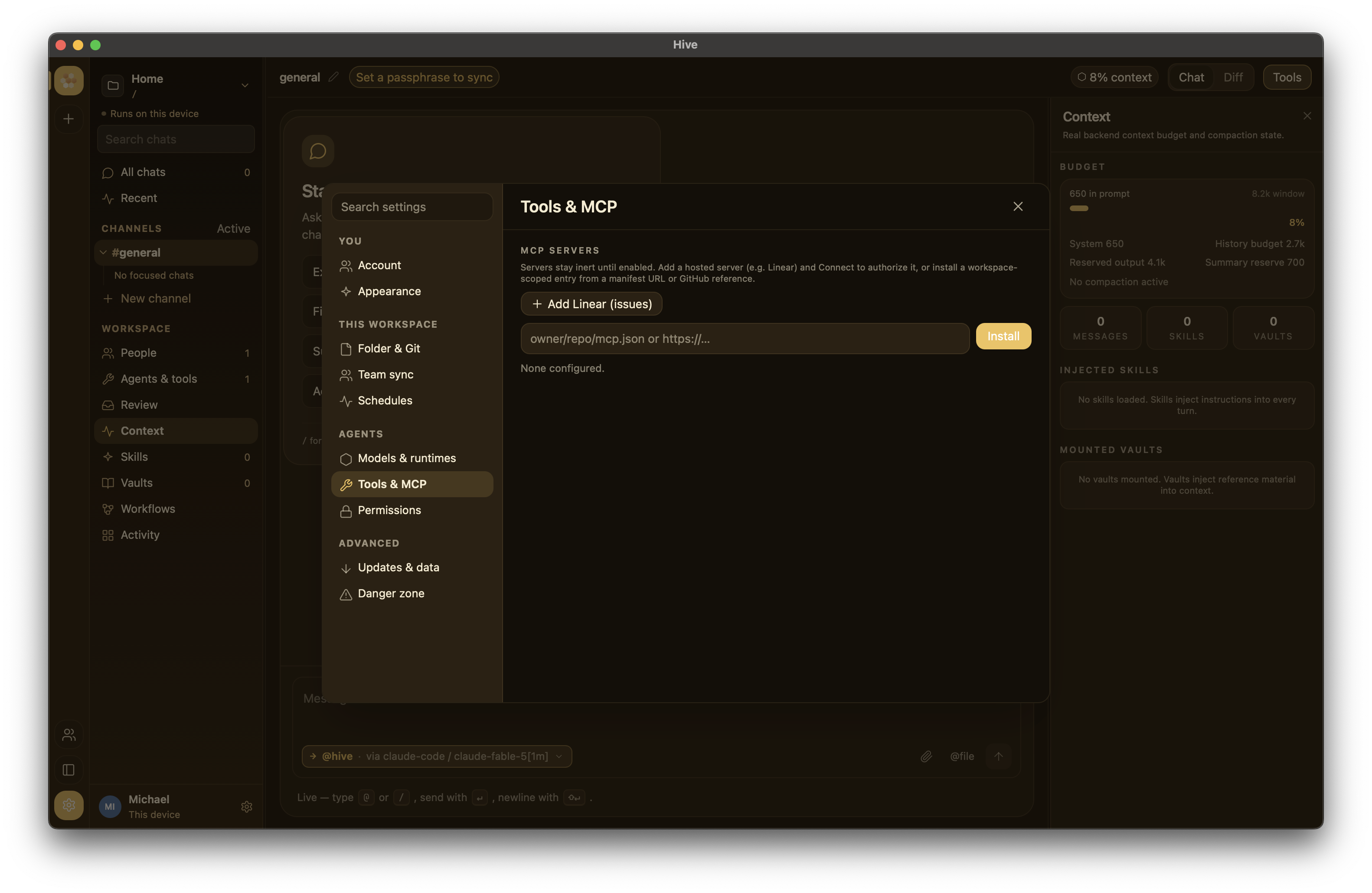
Hive speaks Model Context Protocol — the spec for LLM tool servers Anthropic standardized. Each MCP server is a separate process (or HTTP endpoint) that exposes named tools the agent can call.
Use MCP when you want to:
- Surface a new tool to your agents (file-system, HTTP, database, proprietary internal API).
- Share a tool set across many agents and workspaces.
- Run a long-lived tool process separately from Hive.
Don't use MCP when:
- You want a whole agent (wire a CLI-agent runtime instead — aider, pi, or Claude Code; see BYO agents).
Configuration
[[mcp_servers]]
id = "filesystem"
transport = "stdio"
command = "/usr/local/bin/mcp-filesystem"
args = ["--workspace", "."]
enabled = false
Or HTTP:
| Field | What |
|---|---|
id |
Workspace-unique identifier |
transport |
stdio or http |
command / args |
For stdio — Hive spawns it |
url |
For HTTP — the endpoint Hive talks to |
enabled |
Inert until true (default false); enabling launches/connects it |
Install from the internet
You don't have to hand-edit TOML. In the right-rail Tools pane,
Install from the internet fetches a server's JSON manifest and adds it to a
per-workspace catalog (.hive/mcp-servers.json). Accepted references:
https://raw.githubusercontent.com/owner/repo/main/server.json
https://github.com/owner/repo/blob/main/server.json   # blob URLs become raw
owner/repo/path/server.json                            # shorthand, ref defaults to main
The manifest can be a flat object or the Claude-desktop shape:
An http server uses url (or endpoint) instead of command:
Install is inert — enabling launches it
Installing never runs anything
A freshly installed server is disabled. Hive does not touch its command or endpoint until you flip Enable. Enabling is the step that launches a stdio command or connects to an endpoint — only enable servers you trust.
Enabling registers the server with the live runtime so its tools connect; disabling reverses that; Remove deletes it from the workspace catalog. Enablement is per server — an enabled server exposes all of its tools to the model. To narrow what an agent can reach, enable only the servers whose tools you want available (or split a broad tool set across separate servers).
Static bearer tokens
Some HTTP MCP servers are protected by a fixed API token instead of OAuth.
In Settings → Tools, open Add HTTP server and fill in Name,
URL and Bearer token (optional). For a server you already added,
click Set token (or Clear token) on its row. Hive sends the token as
Authorization: Bearer <token>.
The token is a device-local secret, stored like provider API keys in this
device's settings.json:
- It is never written to
hive.config.toml,.hive/mcp-servers.jsonor a config export, and never synced to the relay. Set it again on each device. - Settings shows only token set; the value is never shown again.
If a server has both a static token and an OAuth token from Connect, the static token wins. Clear it to go back to OAuth. Removing a server also removes its saved token.
Remote MCP servers (OAuth)
Beyond stdio and static-token http servers, Hive speaks the modern
Streamable-HTTP transport with OAuth 2.1 + PKCE — for hosted MCP
services that authenticate you in the browser and hand back short-lived,
auto-refreshing tokens. There's a one-click Add Linear (issues) preset
and a per-server Connect button that runs the browser flow (loopback
redirect http://127.0.0.1:51736/callback).
See Linear & remote MCP servers (OAuth) for the full
walkthrough, including creating a Linear OAuth app and the /linear
composer command.
Health & status
The Tools pane shows MCP connectivity:
- Green: all enabled servers connected.
- Warm tint: some connected, some failed.
- Gray: none enabled.
Open the Tools pane (the Tools toggle in the chat header) to inspect per-server status.
Recommended ecosystem
- Anthropic's reference servers — filesystem, github, gitlab, postgres, etc.
- Community servers — search GitHub for
mcp-server-*. - Wrappers around your own tools — the MCP TypeScript SDK makes new servers cheap to spin up.