Configuring a runtime
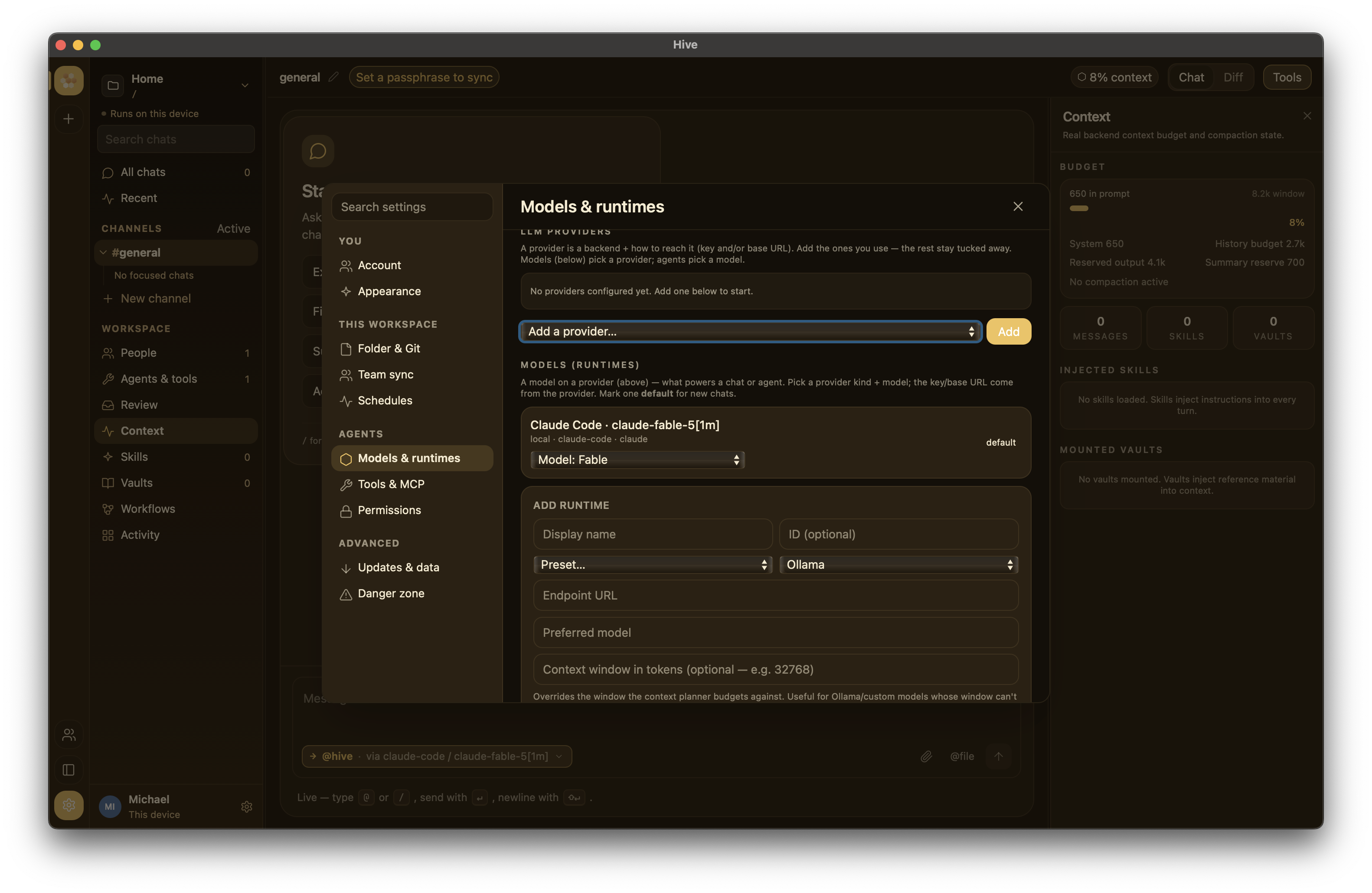
A runtime is whatever LLM (or CLI agent) actually generates the replies in a chat. Hive doesn't talk to a single hard-coded provider — you configure as many runtimes as you want, and chats pick one per session.
Open Settings → Models to add or edit.
Supported providers
| Provider | What it is | Auth | Tools? |
|---|---|---|---|
ollama |
Local Ollama daemon (spoken natively) | none | yes (MCP tools) when the runtime's Supports tools switch is on and the model reports tool support |
openai |
OpenAI's API (or any OpenAI-compatible endpoint) | OPENAI_API_KEY env / pasted key |
yes (MCP tools) |
anthropic |
Anthropic's API | ANTHROPIC_API_KEY env / pasted key |
yes (MCP tools) |
openrouter |
OpenRouter aggregator | OPENROUTER_API_KEY env / pasted key |
yes (MCP tools) |
claude-code |
Local claude CLI (uses your Claude Pro/Max sub) |
depends on Claude CLI | yes (Claude Code's own tools) |
aider |
Local aider CLI |
depends on aider's config | yes (aider's own tools) |
pi |
Local pi CLI |
depends on pi's config | yes (pi's own tools) |
hive-daemon |
Remote hived instance |
bearer token | passthrough |
custom |
OpenAI-compatible HTTP endpoint | varies | varies |
claude-code, aider, and pi are the subprocess runtimes — Hive
launches a local CLI. There is no generic subprocess provider; to
point Hive at some other OpenAI-compatible server, use custom.
Provider presets
When you add a runtime in Settings → Models, the picker offers presets that pre-fill the endpoint and capability flags so you don't have to remember them:
- OpenAI —
api.openai.com. - OpenRouter — the OpenRouter aggregator.
- Azure OpenAI — an Azure deployment endpoint (your
https://<resource>.openai.azure.comURL + deployment name). - Ollama — your local Ollama daemon.
- Local gateway (llama.cpp, OpenAI-compatible) — a
customruntime for llama.cpp servers behind an OpenAI-compatible gateway, with tools on. Replace<host>in the endpoint with the gateway's address. See Offline setup with local models. - Custom — any other OpenAI-compatible HTTP endpoint; fill in the base URL yourself.
All of these are OpenAI-wire-compatible, so the same multi-turn tool loop works across them. Pick the closest preset, then adjust the endpoint, model id, and API key as needed.
Runtime config schema
Each runtime is a [[runtimes]] block in hive.config.toml. The
Settings UI is a GUI over the same fields:
[[runtimes]]
id = "anthropic-claude"
name = "Anthropic Claude"
provider = "anthropic"
kind = "remote"
endpoint = "https://api.anthropic.com"
preferred_model = "claude-sonnet-4-5"
supports_tools = true
performance_score = 9.5
cost_per_1m_input_tokens_usd = 3.0
For subprocess agents (aider, pi), endpoint is the binary path:
[[runtimes]]
id = "aider"
name = "Aider"
provider = "aider"
kind = "local"
endpoint = "/usr/local/bin/aider"
preferred_model = "gpt-4o"
supports_tools = true
See the Configuration reference for every field.
API providers — environment variables
For API providers, Hive can read the credential from an environment variable you control. Set it in your shell config before launching:
# ~/.zshrc
export ANTHROPIC_API_KEY="sk-ant-..."
export OPENAI_API_KEY="sk-..."
export OPENROUTER_API_KEY="sk-or-..."
Environment variables are a convenient fallback — quitting and
relaunching picks up new ones. Note that a key you paste into
Settings → Models is saved to disk in settings.json under
the app data dir (so it persists across launches); it is stored in
plain text, protected only by your OS account and disk encryption. Use
the env-var path if you'd rather the key never be written by Hive.
Subprocess agents — installing the binary
Aider and pi are user-supplied CLIs; install them yourself and point Hive at the binary:
Then point Hive at /usr/local/bin/aider.
Install the pi CLI (an OpenAI-compatible coding-agent backend), then point Hive at its binary:
Hive bootstraps a temporary models.json and PI_CODING_AGENT_DIR
so pi can reach your configured OpenAI-compatible endpoint (see
crates/hive-runtime/src/provider/subprocess.rs).
For any other OpenAI-compatible server, don't install a binary — add a
Custom runtime (provider = "custom") and fill in the base URL, as
described under Provider presets.
Picking which runtime a chat uses
When you create a new chat, Hive picks the workspace's
default_runtime. Switch per chat from the Primary runtime select
just above the composer — it lists every configured runtime; choosing
one re-points that chat.
To have a named agent always use a specific runtime, configure a
Workspace Agent in Settings → Models and
address it by its @handle from the composer.