Invites & joining
Workspaces are private by default. To let a peer in you share an invite — an opaque code that carries everything they need to sync: the relay, the room, and the end-to-end-encryption key. There are three ways to bring someone in.

Create / join a team (the + button)
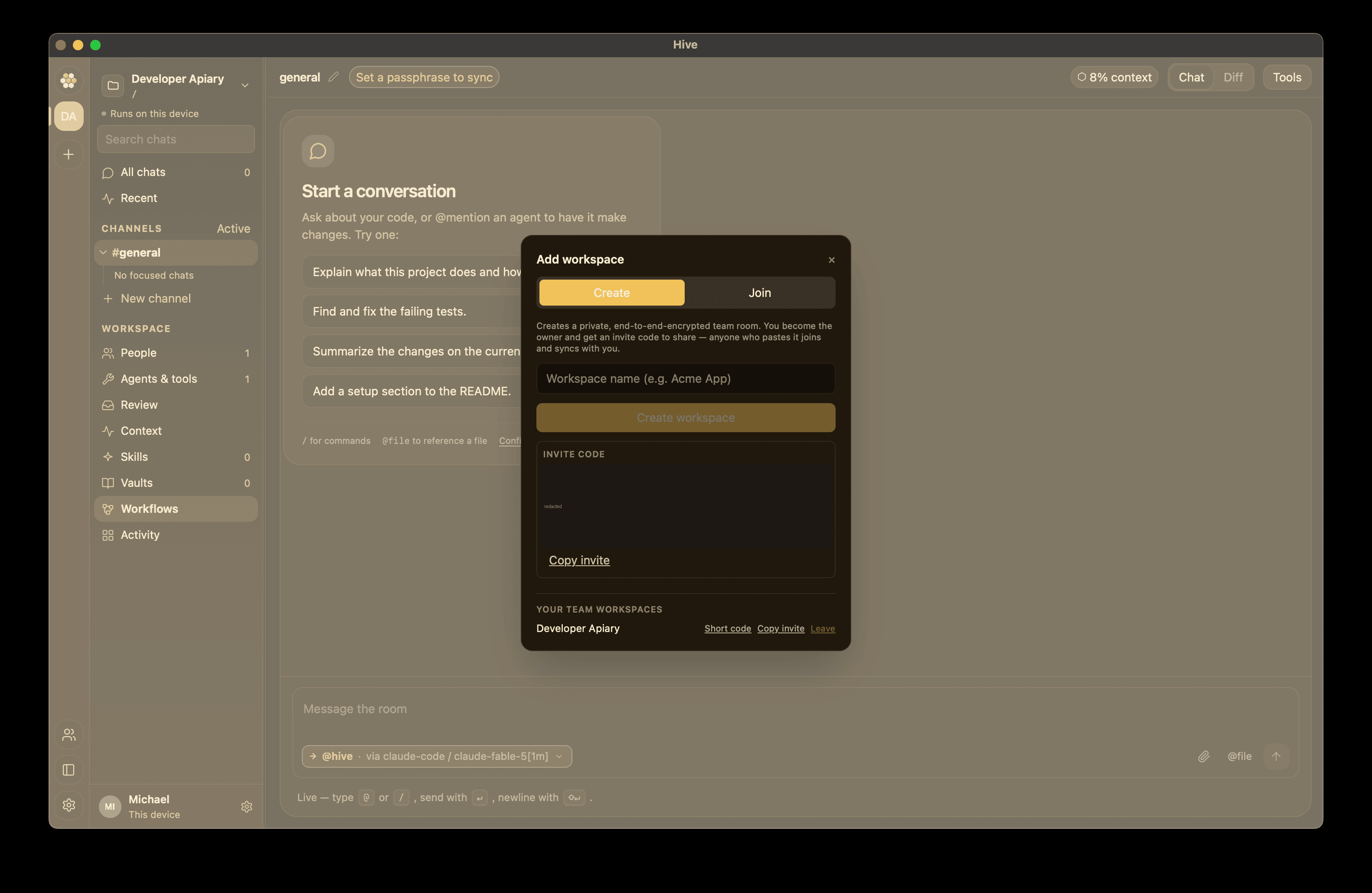
The common path is the workspace rail's + button, which opens the Add workspace modal with two tabs:
Create — name the workspace and Hive spins up a private, end-to-end-encrypted team room (it generates the room id and the E2EE key). You become the owner and immediately get an invite code to share. Anyone who pastes it joins and syncs with you.
Join — paste an invite code someone shared with you and click Join workspace. The code carries the relay, room, and key, so joining is a single paste — nothing else to configure. You show up in the workspace roster immediately on joining — no need to open a chat first before the rest of the team sees you.
Invite codes look like hivews1:… (see the
invite code reference for the
format). Because the code embeds the workspace key, treat it like a
secret — share it over a channel you trust.
The relay-brokered short code — a brief token (e.g. K7P2QX) that
published the full invite to the relay so a peer could redeem it — has
been removed: it put the workspace key on the relay, which E2EE now
forbids (see Security & trust). Share the
full hivews1: code out-of-band instead, or use
invite by GitHub handle for a paste-free
path that keeps the key off the relay.
You can Copy invite (the full hivews1: code) or Leave a
workspace from the Your team workspaces list.
Invite by GitHub handle
Open the People pane on the right rail and use Invite by
GitHub handle. Enter someone's @handle and Hive:
- Looks them up in the relay directory (they must have signed in to Hive with GitHub at least once).
- Adds them to the roster keyed by their stable GitHub account id.
- Seals the workspace key to every one of their devices — so the key never travels in a pasteable code at all.
This is the most secure path: nothing sensitive is copy-pasted, and the invitee's laptop and desktop both come online as one member with multiple devices. It needs a relay and your own GitHub sign-in (Settings → Account).
Import a roster from a GitHub org (enterprise)
For larger teams, seed the workspace roster from a GitHub organization's Teams instead of inviting people one at a time. In the People pane, use the Import GitHub org card:
- Sign in with GitHub with the
read:orgscope (Settings → Account). - Enter the org slug (e.g.
acme-inc). - Hive pulls the org's Teams and adds their members to the roster.
Governance roles are mapped from each member's team slug:
| Team slug contains | Role assigned |
|---|---|
admin, owner, lead, maintain |
Admin |
read, viewer, guest, audit |
Viewer |
| anything else | Contributor |
A member who appears on several teams gets the highest role they qualify for. You still control the roster afterward — imported members can be promoted, demoted, or removed like any other.
Nearby on LAN (roadmap)
Zero-config nearby discovery on the same network — synthesizing an invite from a local announcement so peers can join without pasting a code — is a tracked follow-up and not in the current build. See LAN discovery. For now, share an invite code (above) or point both peers at a relay.
Cross-network sync
Peers on different networks converge through a shared relay: set the same Relay URL and join the same room + key (an invite code does this automatically). Configure the relay under Settings → Team. See Self-hosting a relay for how to run one.
Revocation
To remove a peer, open the People pane and use one of the two controls on their row:
- Remove — takes them off the roster only. Their past envelopes stay in history.
- Remove & revoke — removes them and rotates the workspace key, so they can't read any new messages. Use this for a bad actor or a lost device.