Settings
Hive's Settings view has a grouped, searchable sidebar so the page
isn't one overwhelming scroll — only the active section mounts. The
groups are You (Account, Appearance), This workspace (Folder &
Git, Team sync, Schedules), Agents (Models & runtimes, Tools & MCP,
Permissions), and Advanced (Updates & data, Diagnostics, Danger
zone). A Search settings box at the top filters the nav by section
name and by the controls a section contains — typing api key,
dark mode, relay, or bypass jumps you to the right place.
Every section applies its changes immediately (no Save button).
Workspace-scoped config (runtimes, MCP servers) is written back to
hive.config.toml; connection settings persist to a settings.json in
the app data dir; the theme is stored locally per device.
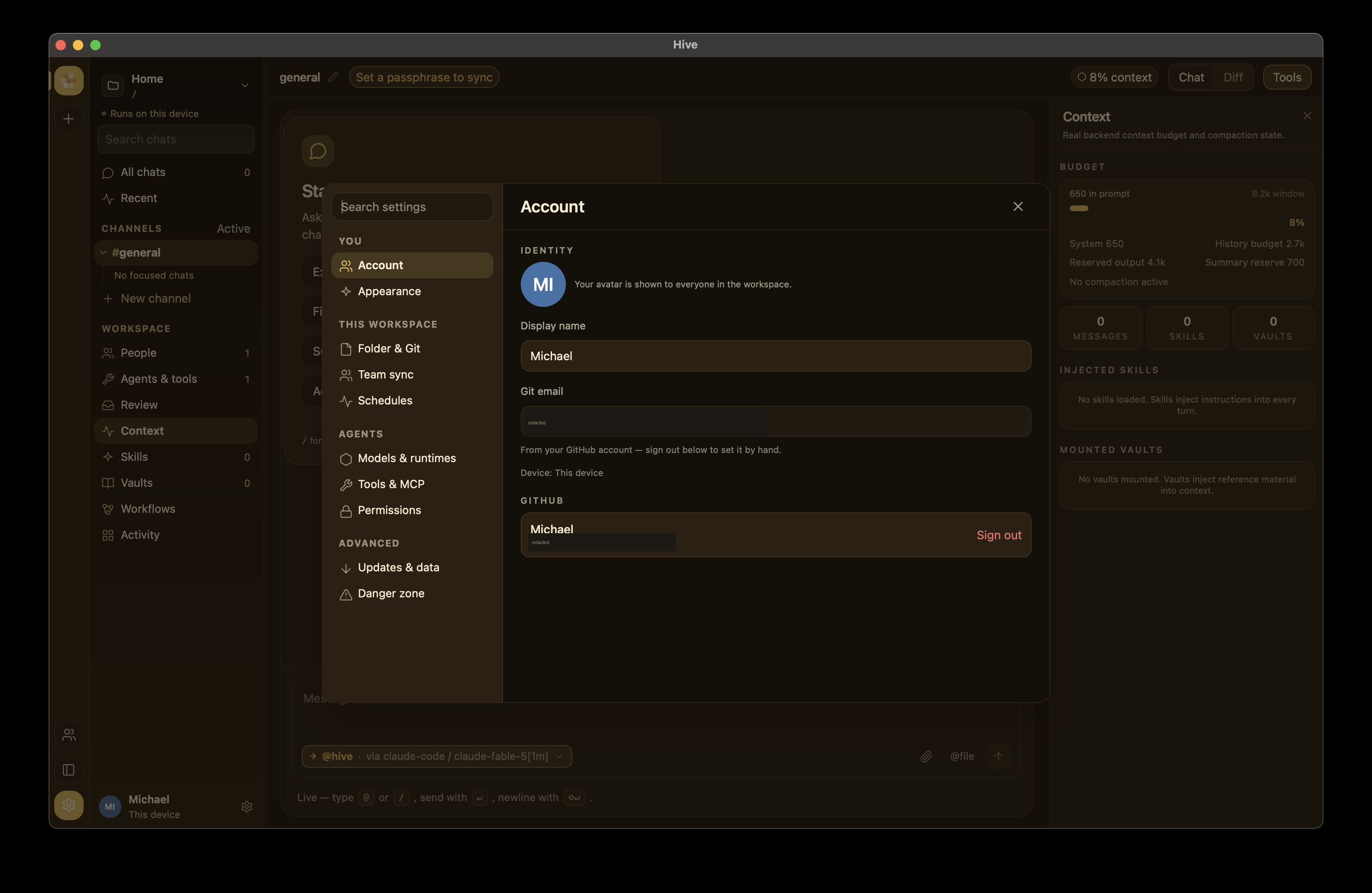
Account
- Identity — your display name (part of the
(@handle, device)pair Hive signs envelopes with) and your git email. When you're signed in to GitHub the git email is managed from the account (sign out to edit it by hand). - GitHub — sign in with GitHub (OAuth device flow) for a stable
identity across all your devices and to invite teammates by
@handle. The same GitHub account on your laptop and desktop resolves to one member, two devices. See Identity & devices. Official builds ship with the OAuth App client id baked in; forks can paste their own.
Appearance
- Mode —
Auto(follows your OS light/dark setting, any platform),Light, orDark. - Theme — the accent family: pollen (the honey-gold default), studio (neutral graphite), harbor (ocean blue), meadow (green), slate (cool, low-chroma blue-grey), or obsidian. Most themes have a light and a dark variant and the mode picks which; obsidian is a true dark, monochrome theme — a neutral near-black glass with an achromatic silver accent that stays dark regardless of the Mode toggle.
Folder & Git
Each workspace links to a folder on this device — its code directory, which drives the Code view, the Diff canvas, and git integration. Set it with the Choose folder… button (a native OS directory picker) or by typing/pasting a path. The section also shows a one-line git status (current branch + changed-file count) and an Open in editor shortcut.
The folder link is per workspace and local to this device — it's never synced, so teammates in the same workspace each point it at their own clone. Switching workspaces switches the folder the editor/terminal/ Diff and agents operate on; a workspace you haven't linked yet shows a link-a-folder prompt in the Code/Diff canvas (you can still chat, review, and drive remote agents while it's unlinked). See Workspaces and Git integration.
Team sync
Everything needed to share a workspace, editable at runtime (applied within a few seconds, no restart). Teams are normally created/joined from the workspace rail's + button (which generates the room, key, and a shareable code); this tab is the manual/advanced surface and the relay configuration:
- Relay URL — peers on the same relay + room converge. Blank =
local-only. Use the https base origin (e.g.
https://relay.example) — no/v1suffix, nowss://. - Relay access token — needed only for a gated/paid hosted
relay; leave blank for a relay you host yourself (the open default).
Sent as a bearer on every relay request; never echoed back. If your
token was issued as
name:token, either form works — Hive sends just the token part. - Test connection — actually hits the relay and reports Connected, Unauthorized (reached it, token rejected), or Unreachable. The status card above it only means a URL is configured; the probe is the source of truth for whether it works.
Under Advanced — set room & key by hand:
- Room + Workspace key — the room id and the shared passphrase
→ end-to-end encryption; the relay sees only ciphertext (status shows
🔒 encrypted). - Relay issuer key — an Ed25519 seed (64-hex) that lets you mint
agent identity tokens locally for the People pane's Add a remote
agent flow. It's stored on this device only and never leaves it; the
field shows
✓ setonce configured (enter a new value to replace it). See Remote agents.
See Self-hosting a relay, the small-team deployment guide, and the pricing tiers.
Team members

On a relay that supports it, the Team sync tab also has a Team members panel for managing who may sync — durable, with no redeploy and instant revocation:
- Add member — give a name (and optionally their GitHub login); Hive creates the user on the relay and shows a one-time access token. Copy it now — it's never shown again — and the teammate pastes it into the Relay access token field of their Hive.
- Add token — issue an extra token for an existing member (e.g. a second device).
- Revoke — kill one token immediately; the device using it stops syncing at once.
- Disable / Enable — turn a whole member off (revokes all their tokens at once) without deleting them.
Tokens are stored on the relay only as hashes — Hive shows the raw value once and never again. This panel appears only when you're an admin on a relay that supports user management (your GitHub login is in the relay's admin list); everyone else sees a short explanatory note instead. Managing members needs you signed in to GitHub (Settings → Account). See Managing relay access.
Schedules
Define scheduled agents — recurring runs that kick off a chat turn on a cron-like schedule without you present. Each schedule has a label, the prompt to send each run, a cadence (Every interval or Daily at a time), and an optional runtime to pin it to (defaults to the chat's primary runtime). See Scheduled agents for the full walkthrough.
Models & runtimes
LLM access is organized as a hierarchy:
- Providers —
anthropic,openAI,openRouter,ollama,azure(Azure OpenAI),custom, plus the CLI coding agents:claude(Claude Code),pi,aider, Codex (OpenAI'scodex exec), and Hermes (any stdin-driven CLI — set the executable + flags on the runtime). API providers hold their own API key and optional base URL (so multiple providers can have distinct keys, including any generic OpenAI-compatible endpoint); the CLI agents use their own login and need no key. - Models (runtimes) — a model on a provider (id + capability flags). The add form includes an optional Context window in tokens — set it for Ollama/custom models whose window Hive can't infer from the name; the context planner budgets against it. Ollama runtimes add Keep alive (how long the server keeps the model loaded) and Let the model think (reasoning models: the chain of thought streams live but never lands in the transcript).
- Models panel (Ollama) — each Ollama runtime row has a Models
panel showing what is installed on that server (parameters, quant,
size, a loaded badge with the context window it is loaded at).
Pull a new tag or Update an installed one with per-layer
progress, Cancel a pull (the server keeps downloaded layers, so a
retry resumes), Remove a model, or Use one to point the
runtime at it — no ssh +
ollama pullneeded. - Agents — reusable personas (name + model/runtime + role + instructions) you can attach to any chat.
The default runtime is the claude CLI — no API key needed, it uses
your Claude subscription. See
Configuring a runtime.
Detect my setup
Detect (then Re-scan) sweeps the machine for providers that
would answer right now — a running Ollama, CLI agents already on your
PATH (claude, codex, aider, …), and API keys present in the
environment — and offers to add each with one click, so a fresh install
is usable without hand-typing config.
Testing a provider or model
- On a provider row, Test makes a real call and reports whether the stored key/endpoint actually works.
- In the add-model form, Test validates the just-typed key/base URL before you save, and Add model then registers a ready-to-use runtime for that model.
Portable config
Export dumps this machine's runtimes + MCP setup as a hive.toml
you can copy to another device or share with a teammate; Import
stamps a pasted hive.toml onto this machine (additive — it adds
what's missing and never deletes what you already have). API keys travel
with the export, so treat it like a secret.
Context commands
The instructions behind /summarize and /compact are editable here —
blank uses the built-in default (shown as the placeholder). The
/summarize instruction also guides the automatic summarization of
overflowed history. See
Managing context.
Tools & MCP
Install / enable / remove Model Context Protocol (MCP) servers. An
installed server stays inert until you enable it — enabling is what
launches the command or opens the connection, and only enabled servers
expose their tools to agents. Two transports: stdio (Hive spawns the
binary) and http. See MCP servers.
Permissions
How agents are allowed to touch files — and this differs per agent type (Claude Code is not the only agent that edits files):
claudepermission mode —Read-only(default; proposes edits but blocks writes),Accept edits(can write files), or Bypass all permissions (also runs shell commands). Injected as--permission-modeinto theclaudeCLI, which runs headless and can't show an interactive prompt. Because bypass mode grants unattended file and shell execution, switching into it pops a confirmation dialog first — the same friction a data reset gets.- aider / pi gate via their own flags.
- API/MCP-backed agents can only call the MCP tools you've enabled on the Tools & MCP tab — an installed-but-disabled server is inert, so nothing runs until you turn it on.
Updates & data
- Check for updates — reports the version you're on and checks whether a newer signed build is available, then installs it. The auto-updater activates for signed builds; on current unsigned dists a lightweight version check still notifies you when a newer release is published.
- Export data — download a copy of this device's local data.
Diagnostics
Open the log file (structured logs plus panics) — useful when
something misbehaves silently. Set HIVE_LOG=debug in the environment
before launching for verbose output while you're chasing an issue.
Danger zone
Reset local data wipes this device's chats, identity, keys, settings, and workspaces, then relaunches Hive fresh. It's the supported way to start over — uninstalling leaves data behind. See Reset local data for the per-OS data directories.
Remote agents (People pane)
Not a Settings tab, but the counterpart to the Relay issuer key above: the right rail's People pane has a Remote agents section (shown once a relay is connected). Enroll a remote agent by handle and Hive generates the exact command — with the relay URL, room, a minted agent token, and workspace credentials filled in — for a developer to copy and run on the agent's box. Detached agents run on workspace credentials, never a personal API key. See Headless agents.
Notes
- New chats are auto-titled from the opening exchange using the chat's primary runtime — no setting required. Rename any chat with the ✎ pencil next to its title.
- System tray / menu bar — the tray icon's menu jumps straight to Friends, Team & Relay Sync (this page's Team sync tab), and Settings, besides showing/quitting the app.
- Focus mode — collapse the sidebar with ⌘B (or the panel button at the bottom of the workspace rail) and the tools rail with ⌘J (or the Tools button in the chat header). Both persist across restarts, and both live in the ⌘K palette as "Toggle sidebar" / "Toggle tools rail".
- Workspace config round-trips through the TOML encoder, so hand-edited
and GUI-edited
hive.config.tomlfiles stay compatible (comments aren't preserved). Seehive.config.tomlreference.