Agentic workflows
Workflows turn a chat's agents into a pipeline: a set of stages wired into a DAG, where each stage is either an agent turn or a human approval gate. Stages with no unmet dependencies run in parallel; gates pause the run until enough people approve.
Everything a workflow produces lives in the chat itself — stage prompts and replies are ordinary messages, gates are ordinary proposals in the Review pane — and the workflow definitions and run records sync end-to-end encrypted with the workspace, so teammates watch a run progress live and can vote its gates from their own devices.
Presets
Open the Workflows pane in the right rail and add either preset — both are plain definitions you can edit afterwards:
- Review gate — one agent implements your request, a second critiques the result, then a gate holds the run until you approve. Rejecting the gate sends the work back to the implementation stage for another pass (bounded — three rejections halt the run).
- Fan-out + vote — three agents attempt the task independently and in parallel; a judge stage compares the results and declares a winner.
Presets run on the chat's Primary Runtime out of the box; edit a stage to pin it to any workspace agent instead (a local Ollama triage stage feeding a Claude implementation stage is the classic mix).
The DAG editor
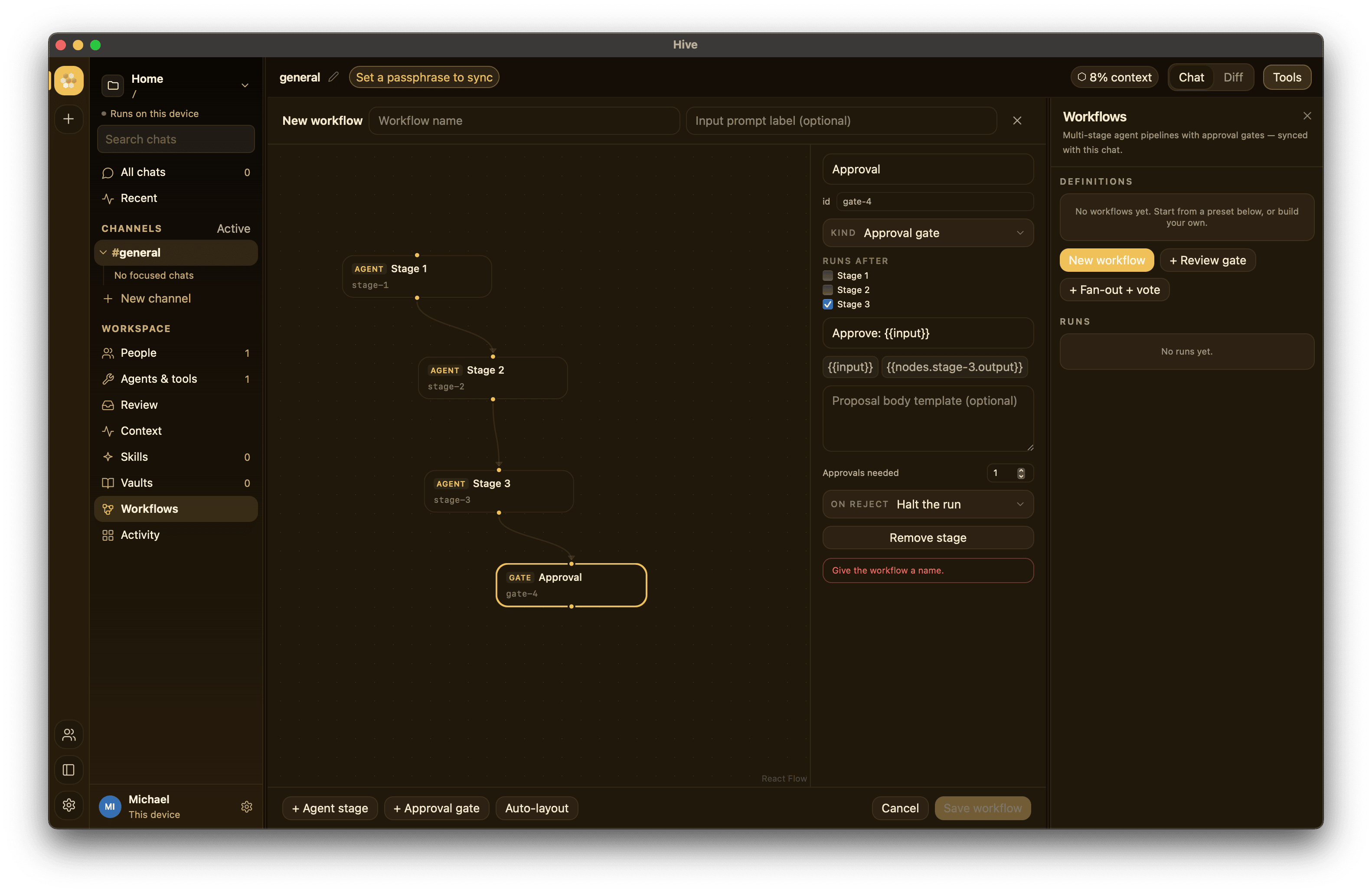
New workflow (or Edit on any definition) opens the visual editor in the main canvas — the same area the Diff view uses — with the graph on the left and a stage inspector on the right:
- The canvas is the DAG. Execution flows top to bottom. Drag stages anywhere (positions are saved with the definition and sync with it); drag from a stage's bottom handle to another's top handle to add a dependency edge; select an edge and press Delete to remove it. Pan and zoom freely; Auto-layout rearranges everything by dependency depth.
- The inspector edits the selected stage: name, a stable id (what templates reference), kind, and a Runs after list — the checkboxes and the canvas edges are two views of the same dependencies.
- Agent stages pick a responder (Primary Runtime or any workspace
agent) and a prompt template.
{{input}}interpolates the run input;{{nodes.<id>.output}}interpolates the full output of an upstream stage — one-click chips above the prompt insert them for you. - Gate stages create a proposal when reached: title/body templates, a required-approval count (quorum), and a rejection policy — halt the run, or route back to an earlier stage and retry.
The editor validates as you type (cycles, dangling references, template
refs that don't point upstream) and the backend re-validates on save. A
dependency edge without a {{nodes.<id>.output}} reference is still
meaningful — it's pure ordering: gates have no output at all, stages that
both edit the working tree need serializing, and a cheap check can
short-circuit an expensive stage (a failed dependency skips everything
downstream).
Loops (iterate until good)
Workflows are DAGs, but a gate that routes back gives you a controlled loop. Set a review gate's rejection policy to route to an earlier stage instead of halt: rejecting then re-runs that stage (and everything after it) and pauses at the gate again, so you can cycle fix → recheck as many times as you need, and approve to move on. Because a person (or a quorum) decides each gate, the loop can't run away on its own — that approval is the exit.
Author loops well: keep the loop body small (the stage to redo plus maybe one
after it), and have the redo stage read the reviewer's notes
({{nodes.review.output}}) so each pass acts on the feedback rather than
retrying blind. Prefer one loop per workflow and keep the rest linear.
@hive knows this pattern — ask it to "draft, have the reviewer critique, and
loop until I approve" and it authors the gate-routes-back workflow for you (see
below).
Agents can build workflows
Ask any agent in the chat — "build me a workflow that triages new issues,
drafts fixes, and holds them for my approval" — and it can author one by
ending its reply with a [[workflow: {…}]] directive. This works on
every runtime (the claude CLI, aider, pi, local Ollama models), because
it's plain text in the reply, not a tool call. Hive validates the
definition with the same rules as the editor, saves it to the chat, and
posts a note; a rejected attempt posts the reason instead.
The directive an agent emits looks like this:
[[workflow: {
  "name": "Bugfix with review",
  "inputLabel": "Which bug?",
  "stages": [
    {"id": "repro",  "prompt": "Reproduce and diagnose: {{input}}"},
    {"id": "fix",    "agent": "Coder",
     "prompt": "Fix the bug given this diagnosis:\n{{nodes.repro.output}}",
     "after": ["repro"]},
    {"id": "review", "kind": "gate", "title": "Ship fix for: {{input}}",
     "body": "{{nodes.fix.output}}", "approvals": 1,
     "onReject": {"retryFrom": "fix"}, "after": ["fix"]}
  ]
}]]
Stages address agents by their roster name (omit agent for the
Primary Runtime), after declares dependencies, and onReject is
"halt" or {"retryFrom": "<stage id>"}. Agent-authored definitions are
inert like any other: they appear in the Workflows pane (and open in
the DAG editor) but only a human can run them. Agents get planning
authority, never execution authority.
Recipes
Some shapes that work well — build them in the editor, or just describe them to an agent and let it author the definition:
Cost-tiered fixing. A free local model does the wide, cheap work; the expensive frontier model only runs on what survives.
| Stage | Kind | Runs after | Notes |
|---|---|---|---|
triage |
agent (local Ollama) | — | "Rank these failures by likely root cause: {{input}}" |
fix |
agent (Claude) | triage |
Works from {{nodes.triage.output}} |
ship |
gate | fix |
1 approval, reject retries fix |
Cross-vendor adversarial review. The reviewer is a different model family than the author, so they don't share blind spots — something single-vendor tools can't express.
| Stage | Kind | Runs after | Notes |
|---|---|---|---|
draft |
agent (Claude) | — | Implements {{input}} |
attack |
agent (another vendor/model) | draft |
"Find what's wrong with: {{nodes.draft.output}}. Be adversarial." |
repair |
agent (Claude) | attack |
Fixes what the attack found |
gate |
gate | repair |
Human ships it |
Spec fan-out with a team gate. Three independent drafts, a judge, and a quorum of two teammates before anything counts as decided — run it in a shared workspace and both approvals can come from different devices.
| Stage | Kind | Runs after | Notes |
|---|---|---|---|
draft-1..3 |
agents | — | Parallel: "Propose an API design (variant N): {{input}}" |
judge |
agent | all three | Compares, declares a winner |
adopt |
gate | judge |
approvals: 2 — real team sign-off |
Docs pipeline. Draft → fact-check against the vaults loaded in the session → editorial gate; rejection reroutes to the draft stage with the checker's notes already in the transcript.
Running
Hit Run, give it an input, and watch the run card: one chip per stage,
colored by state, with the output preview on hover. Stage turns stream into
the transcript under a [Workflow · name → stage] header. Awaiting gates
show approve/reject right on the card (they're also in the Review pane).
Cancel stops a run between stages; Resume restarts a run that was
interrupted (say, by an app restart) — finished stages keep their outputs.
Current limits
- A run executes entirely on the device that starts it, so every stage's agent must be runnable there (agents owned by other members are rejected at start). Teammates still see the run live and vote gates.
- Definitions belong to the chat they're created in.
- Parallel stages share the chat transcript, so siblings can see each other's prompts in context. The presets are written with this in mind.